Diagnosing Common Query Bottlenecks
Entity Framework Core provides developer productivity, but abstraction layers can easily mask suboptimal database query execution. In high-throughput enterprise applications, unmonitored queries frequently introduce severe latency through:
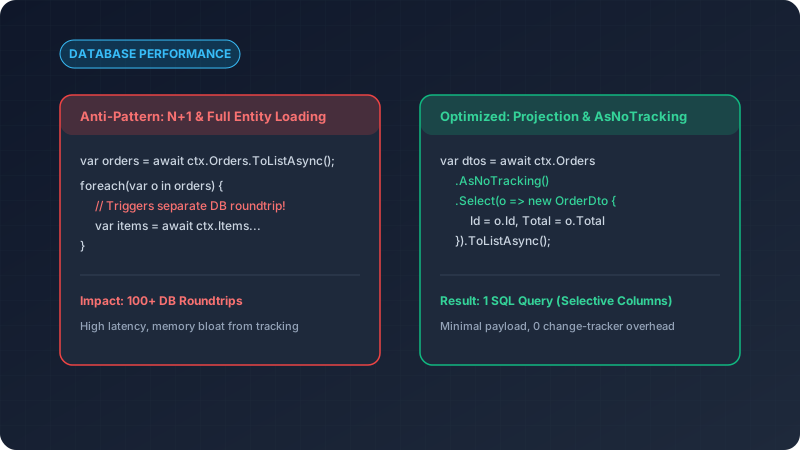
- The N+1 Query Problem: Fetching a parent collection and then iteratively querying related children within a loop.
- Over-Fetching Columns: Loading entire entity trees into memory when only a handful of scalar properties are displayed.
- Change Tracker Overhead: Tracking entity state for read-only dashboards where no database updates occur.
Core Optimization Strategies
1. Always Use AsNoTracking() for Read Queries
By default, EF Core tracks changes for all queried entities in its ChangeTracker. When reading data for API responses, disabling change tracking yields substantial CPU and memory savings:
// Change tracking disabled: 40-60% faster execution for large result sets
var activeUsers = await dbContext.Users
    .AsNoTracking()
    .Where(u => u.IsActive)
    .ToListAsync(cancellationToken);
2. Project Explicitly with Select
Loading full entities transfers unnecessary database columns and large text blobs across the network:
// Anti-Pattern: Loads full entity graph into memory
var orders = await dbContext.Orders
    .Include(o => o.Customer)
    .Include(o => o.OrderItems)
    .ToListAsync();

// Optimized Pattern: Generates precise SQL SELECT statement
var orderSummaries = await dbContext.Orders
    .AsNoTracking()
    .Where(o => o.Status == OrderStatus.Completed)
    .Select(o => new OrderCardDto
    {
        Id = o.Id,
        CustomerName = o.Customer.Name,
        ItemCount = o.OrderItems.Count,
        TotalAmount = o.TotalAmount
    })
    .ToListAsync(cancellationToken);
3. Split Queries for Large Multi-Include Queries
When multiple collection navigations are included in a single query, relational Cartesian explosion can multiply returned row counts exponentially:
// Generates separate SQL queries to prevent Cartesian product explosion
var orderDetails = await dbContext.Orders
    .AsSplitQuery()
    .Include(o => o.OrderItems)
    .Include(o => o.StatusHistory)
    .FirstOrDefaultAsync(o => o.Id == orderId, cancellationToken);
Summary Takeaways
- Inspect the generated SQL using EF Core’s logging features or SQL Server Profiler.
- Restrict tracking solely to units of work where state mutations will be committed.
- Combine covering database indexes with explicit LINQ projections to maximize query efficiency.